> For the complete documentation index, see [llms.txt](https://apidocs.gsped.com/llms.txt). Markdown versions of documentation pages are available by appending `.md` to page URLs; this page is available as [Markdown](https://apidocs.gsped.com/gsped-api-english-version/spedizioni-e-dintorni/shipment/corrieri/poletto-group.md).
# Poletto Group
## Gsped code list
| Service | Courier code | Service code | Notes |
| -------------- | ------------ | ------------ | ------------------------ |
| Standard | 40 | 0 | Domestic / International |
| Standard Timed | 40 | 1 | Domestic / International |
| Non Stop | 40 | 2 | Domestic / International |
| Non Stop Timed | 40 | 3 | Domestic / International |
## Custom parcel labels
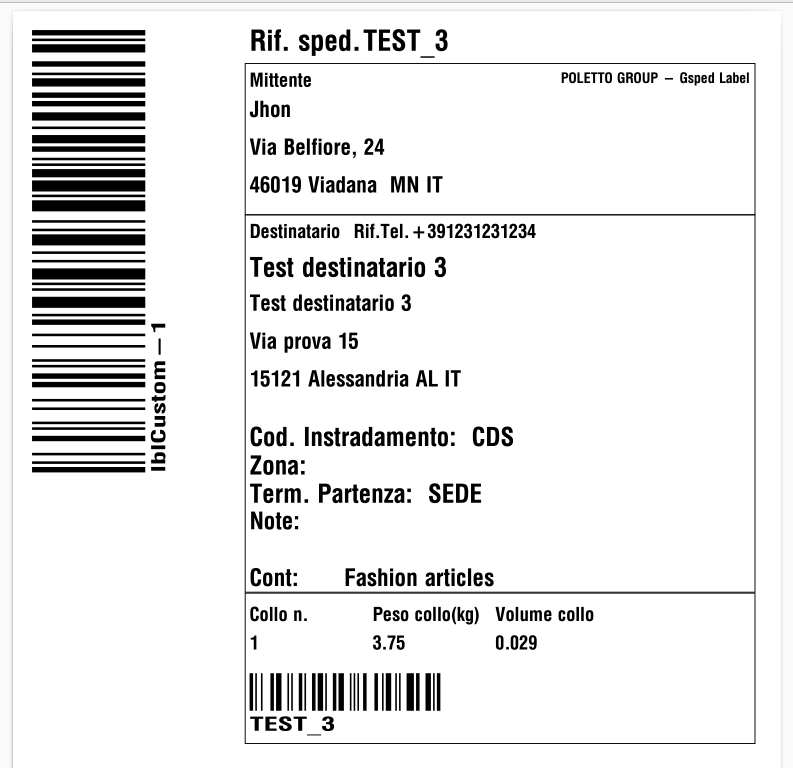
This courier lets you use your own parcel barcodes instead of those provided by the courier.
The parcel barcodes can be given inside the parcel details, in the **label\_barcode** field:
```json
"daticolli": [
{
"altezza": 25,
"larghezza": 33,
"lunghezza": 35,
"volume": 0.028875,
"peso": 3.75,
"label_barcode": "lblCustom-1"
},
{
"altezza": 25,
"larghezza": 33,
"lunghezza": 35,
"volume": 0.028875,
"peso": 3.75,
"label_barcode": "lblCustom-2"
}
]
```
In special cases where the parcel details (weight, volume, dimensions) are not available, you can give only the parcel barcodes inside the poletto-specific data:
```json
"poletto": {
"segnacolli": [
"lblCustom-1",
"lblCustom-2"
]
}
```
{% hint style="warning" %}
**WARNING:** The number of parcel barcodes **MUST** match the total number of parcels in the shipment
{% endhint %}
Below is an example of a label showing your own barcode
### Custom parcel label during Add Parcel
You can also use your own parcel barcodes during add parcel.
In the call that adds a new parcel through the Parcels endpoint (POST), simply add the **label\_barcode** parameter inside the parcel details.
Example:
```json
{
"id_sped":ID_SPEDIZIONE,
"collo": {
"peso": "4.71",
"volume": "0.02",
"larghezza": "20",
"altezza": "21",
"lunghezza": "22",
"label_barcode": "lblCustom-3"
}
}
```
## Long goods
To request the accessory service, include the following in the shipment creation request:
```json
"poletto": {
"merceLunga": true
}
```
## Basement delivery
To request the accessory service, include the following in the shipment creation request:
```json
"poletto": {
"inCantina": true
}
```
## Floor delivery
The courier offers four options:
* Ground-level unloading / porterage
* delivery to the first floor
* delivery to the second floor
* delivery to the third floor or above
To request one of these services, simply use the **consegnaAlPiano** field with the number of the floor where you want the delivery, that is:
* 0 for ground floor delivery
* 1 for first floor delivery
* 2 for second floor delivery
* 3 for delivery to the third floor or above
Example of a request for second floor delivery:
```json
"poletto": {
"consegnaAlPiano": 2
}
```
## Booking on portal
To request the accessory service, include the following in the shipment creation request:
```json
"poletto": {
"prenotazioneSuPortale": true
}
```
## In-transit delivery notice
To request the accessory service, include the following in the shipment creation request:
```json
"poletto": {
"preavviso_itinere": true
}
```
## ZTL
To request the accessory service, include the following in the shipment creation request:
```json
"poletto": {
"ztl": true
}
```
## GDO
To request the accessory service, include the following in the shipment creation request:
```json
"poletto": {
"gdo": true
}
```
## Other accessory services
In addition to the Poletto-specific accessory services, we also handle the following accessory services:
* Phone booking:\
\
Use the **preavviso\_telefonico** field set to "S".\
\
In this case the courier requires the recipient's phone number, or the URL where the courier must make the booking to be given in the notes.
* Tail lift:\
\
Use the **sponda** field set to true.
* Cash on delivery (COD):\
\
Use the **contrassegno** field to give the amount and the **tipo\_incasso** field to give the way the courier must collect the cash on delivery.
Only the following tipo\_incasso codes are allowed:
* Cash: 0, 12
* Cheque made out to the sender: 10, 11, 15
* Insurance:\
\
Use the **valore** field to give the total value to be insured.
## Shipment cancellation
The courier does not provide a cancellation option. Therefore, shipments that have already been created successfully cannot be cancelled.